7 Secrets to Writing AI Product Video Prompts That Turn Viewers Into Buyers

You type “make a cool ad for my water bottle” into an AI video tool. Ten seconds later you get a beautiful clip: glowing light, smooth camera, dramatic music energy. There’s just one problem. The bottle has a different cap, the logo is melted, and the handle you never designed is suddenly there.
That is the gap between a pretty AI video and a sellable one.
The good news: the difference usually isn’t the tool. It’s the prompt. In this guide you’ll learn seven practical secrets for writing AI product video prompts that stay faithful to your product, grab attention fast, and fit the place where your video will actually run, whether that’s a product page, Instagram Reels, TikTok, or a paid ad.
Each secret comes with a copy-paste prompt template you can adapt in minutes.
Start With the Product, Not the Vibe
Most beginners open with mood: “luxury,” “epic,” “futuristic.” Mood is the last thing your prompt needs. AI models fill any gap with invention, and invention is exactly what you do not want when a customer is judging a real item.
What to do instead:
- Use a reference image of the real product whenever your tool allows it.
- Describe the product in physical terms: material, color, shape, size, finish, and visible text.
- List the details that must stay identical across every frame.
Weak prompt:
Strong prompt:
Why it works: You’re shrinking the number of things the AI has to guess. Less guessing means fewer surprises and zero warped branding.
Give Every Clip One Job
A single 6 to 10 second clip cannot explain features, show lifestyle, announce a sale, and build brand mood. When you try, the result feels busy and the product gets lost.
Pick one job before you write a word:
| Job | Question it answers | Typical placement |
|---|---|---|
| Inspect | "What does it actually look like?" | Product page |
| Detail | "How is it made?" | Product page, social |
| Demonstrate | "How does it work?" | Product page, ad |
| Context | "How would I use it?" | Social, ad |
| Tease | "What's coming?" | Launch campaign |
| Convince | "Why should I buy it?" | Paid ad |
Example (Detail job):
One clip, one job, one clear takeaway.
Direct Motion Like a Camera Operator
“Make it dynamic” means nothing to an AI video model. Specific motion does. Think like a seasoned camera operator and set designer: What moves, how fast, and where does it stop?
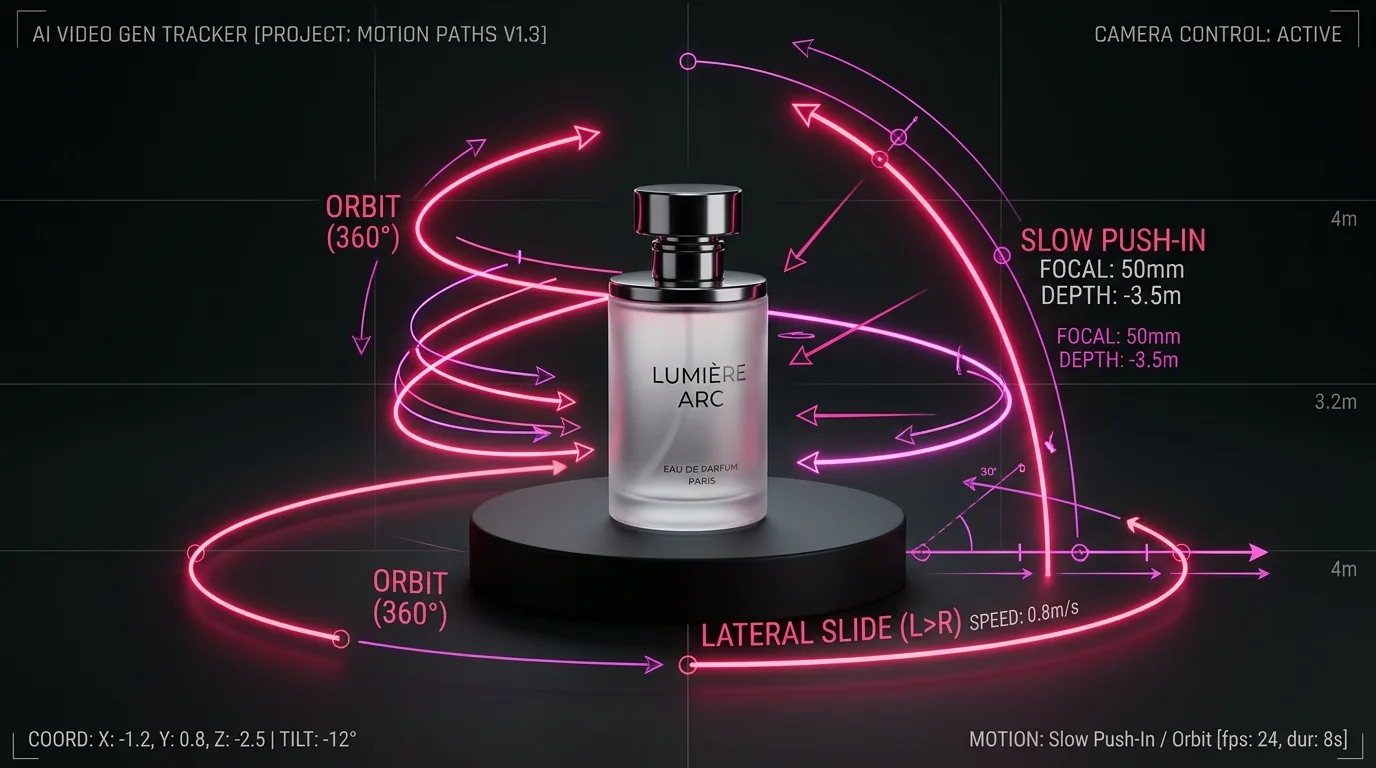
Separate your motion into two deliberate parts:
1. Camera Motion
- Slow push-in
- Gentle lateral slide
- Soft orbit (small arc, not a full circle)
- Locked-off static shot
2. Subject / Environment
- Product stays still while light shifts across it
- Hand places the item on a surface
- Liquid pours, steam rises, fabric flutters
- Product rotates a small, defined amount (30°)
Write the First Two Seconds on Purpose
On social feeds, viewers decide almost instantly whether to keep scrolling. Your opening frame should show the product or the problem right away, not a slow fade from black or an abstract CGI swirl.
Strong openings include:
- The product in clear view with an interesting tactile detail
- A recognizable “before” situation (messy desk, tangled cables, spilled drink)
- A human hand reaching for or using the item naturally
- A surprising but truthful physical close-up
The Mute Check: Mute your video. Can someone still tell what it is and why it matters within two seconds? If not, rewrite the opening.
Also, leave empty space (negative space) in the frame for text overlays you will add later, and keep key visuals away from the edges where platform UI buttons and captions appear.
Build Ads From Short Shots, Not One Long Render
Longer AI video renders tend to drift. Faces morph, objects warp, and logos dissolve. A professional workflow mimics traditional filmmaking: generate separate short shots, then edit them together.
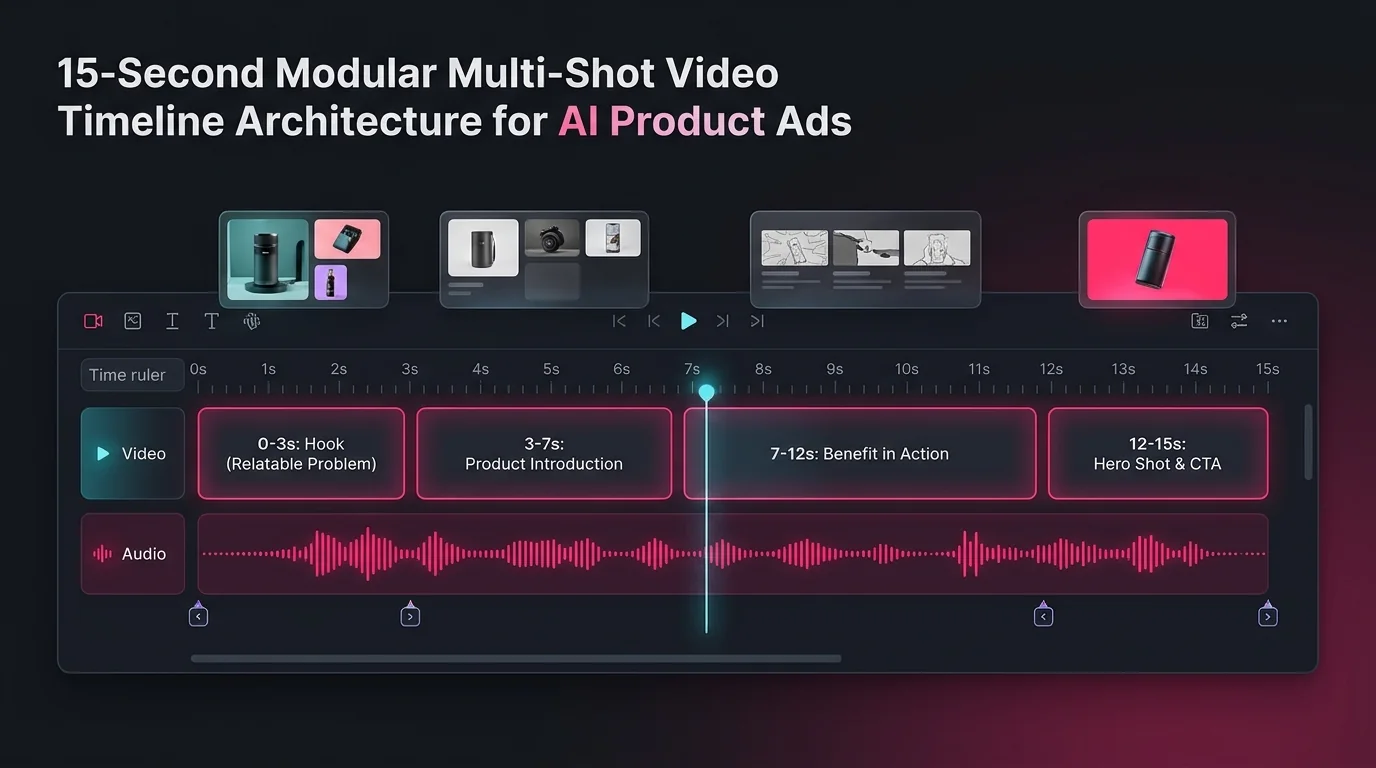
| Time | Shot | Purpose |
|---|---|---|
| 0–3 s | Relatable situation | Hook viewer interest |
| 3–7 s | Product introduced | Instant product recognition |
| 7–12 s | Benefit shown in action | Credible visual proof |
| 12–15 s | Clean hero shot | Space reserved for CTA overlay |
Write a separate prompt for each shot, repeating the same product description and lighting notes so the clips match:
Add Text, Logos, and Prices in Editing, Not in the Prompt
AI video models still struggle with small, precise typography. Labels wobble, letters morph between frames, and prices turn into illegible gibberish. For anything a customer must read correctly, do not let the AI generate it.
Keep these as editable graphic layers in CapCut, Premiere, or DaVinci:
- Brand logo and transparent watermark
- Price, promo codes, and discount badges
- Legal or guarantee disclaimer text
- Call-to-action buttons (“Shop Now”)
- Captions and synchronized subtitles
This one rule eliminates 90% of the most costly rendering mistakes in AI ecommerce advertising.
Review Like a Buyer, Then Iterate One Change at a Time
Generating the video is only half the job. Before you publish, watch it through the eyes of a skeptical customer.
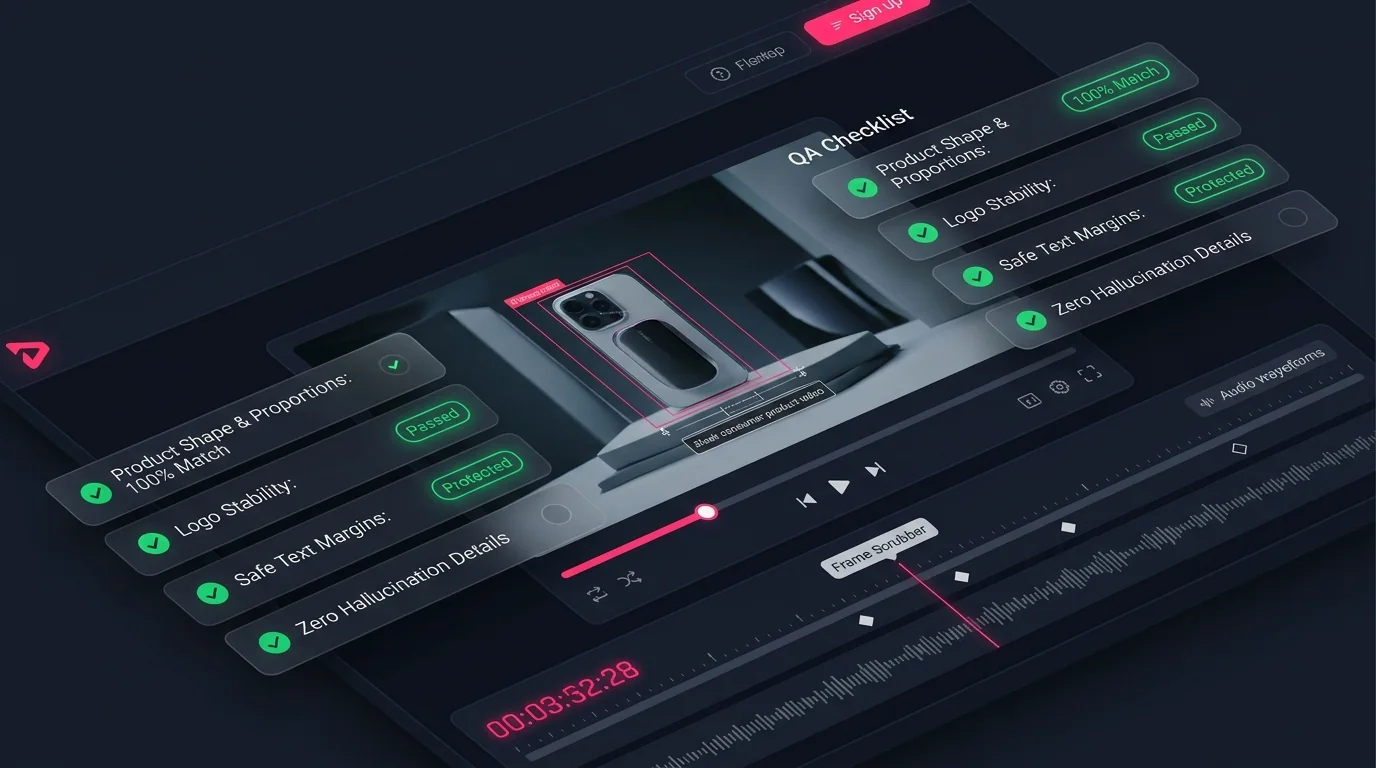
Product Accuracy
- ✓ Shape & proportions match real item
- ✓ Logo and label are stable (no flicker)
- ✓ Count & accessories are accurate
- ✓ No hallucinated features added
Message & Story
- ✓ Opening is clear on mute
- ✓ Delivers one single takeaway
- ✓ No exaggerated false claims
- ✓ Licensed audio and footage
Format & Safe Zones
- ✓ Correct ratio (9:16 / 1:1 / 16:9)
- ✓ Text is legible on small screens
- ✓ Crucial elements inside safe zones
- ✓ Seamless loop or hold frame
Single-Variable Iteration Rule:
When something is wrong, change only one variable per retry. If you rewrite the entire prompt each time, you will never know which phrase fixed or broke the result.
A Reusable Master Prompt Template
Copy this fill-in-the-blank template and adapt it for any ecommerce product video shot:
5 Ready-to-Use Production Prompt Examples
Common Mistakes to Avoid
- •Relying on adjectives. "Stunning, amazing, cinematic" do not tell the AI what to show. Specify camera vectors and physical materials.
- •Asking for hidden sides. One reference photo cannot support a 360° spin without hallucinating fake labels or seams.
- •Overloading one clip. Trying to pack five features into six seconds blurs your core value proposition.
- •Letting AI write your text. Pricing, discount percentages, and brand typography belong in your post-production editor.
- •Skipping the muted test. Over 80% of mobile social viewers watch without sound. If the visual doesn't explain itself, it fails.
- •Ignoring platform aspect ratios. Always render directly in the target aspect ratio (9:16 for Reels/TikTok, 1:1 for feeds, 16:9 for web).
- •Inventing fake proof. Fabricated customer reviews or exaggerated performance claims damage brand credibility.
- •Changing everything at once. Iterate with one single parameter adjustment per render to isolate what works.
AI Product Video Prompts FAQ
What is an AI product video prompt?
It is a structured text instruction that commands an AI video generator how to display your product: exact physical specs, camera vectors, subject movement, lighting, duration, and what elements must remain strictly unchanged.
Can I make a product video from just one photo?
Yes, for short clips with subtle motion such as a slow push-in, lateral slide, or lighting sweep. Avoid shots requiring hidden backs or internal parts that cannot be verified from a single photo.
What video length works best for ecommerce ads?
Short loops (4-6 seconds) excel on e-commerce product pages. 10 to 15 seconds broken into four distinct modular shots works best for paid social ads and Instagram Reels.
Which aspect ratio should I choose?
Use 9:16 for vertical mobile placements (Reels, TikTok, Shorts), 1:1 for square social feeds, and 16:9 for desktop websites and hero banners.
How do I stop AI from morphing my product logo or packaging?
Supply a crisp high-res reference image, keep camera moves smooth and singular, add typography and logos in post-editing, and scrub frame-by-frame before approving.
Should I use AI video instead of real footage?
Not for everything. For mission-critical mechanical demonstrations or regulated products, real footage is superior. AI shines for mood, lighting sweeps, background variations, and rapid creative testing.
Do I need to disclose that my video ad uses AI?
Policies vary by advertising platform and jurisdiction. Always check TikTok, Meta, and Google Ads guidelines, and ensure all claims made in the video are truthful.
Can I A/B test AI product videos?
Yes! Keep the product, offer, and CTA identical, change only the first 2-second hook shot, and run traffic to determine which visual generates the highest click-through rate.
Final Thoughts
AI can generate product clips in seconds, but speed means nothing if the item on screen isn’t the product in the customer’s box. Remember the core principles:
- Start with the real product, not the vibe.
- Give every clip one single job.
- Direct motion like a camera operator.
- Win the first two seconds on mute.
- Build ads from modular short shots.
- Add text, logos, and prices in post-editing.
- Review like a skeptical buyer and iterate one change at a time.
Pick one product, write one prompt using the master template above, and test it today. Keep the versions that work, document your prompt notes, and build a reliable, high-converting video pipeline.
Generate and test video prompts in ProCraft
Explore our AI Video Prompt models including Runway Gen-3, Luma Dream Machine, Kling, and Minimax Video.